Cool a new GlassButton!

GlassButton test demo

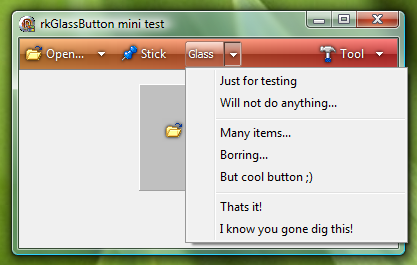
I liked the idea of having a “glassbutton” to use on my VistaPanel. So I decided to try making one. This is the result. It sure took a lot more work than I was thinking it would! Personally I like the result. There are some options to fine tune the result like, Glossy, GlossyLevel and the SingleBorder properties. Best result requires experimenting.

The “Arrow” property will add just that an arrow to the right side of the button. Combining it with the “DuoStyle” property will make the arrow get its own button part. Like you see in the image.

Hope you like it, have fun! Feedback is always welcome!

Download GlassButtonProject(253kB)

Tags: , , ,

  • TheBlub

    Damn you are lightning fast since I posted that it would be fine to have a glassbutton on your panel :-P
    Really happy with the result you did a fine job!

    But! You really should clean up the uses list in your demo source, you are refering to a lot of different buttons which aren't included in that demo so it wont compile it i haden't cleaned up the uses list by hand :-)

    I noticed a little (I don't wanna call it a bug I guess that had to do with parent drawing) issue when I take a Glassbutton and place it onto the form or whatever else… The button doesn't have a glasslook the very first time here. I have to cut it out and re-paste it onto the control or form where I would like to have it. Then it turns into glass immediatly which is fine…

    Maybe a little adjustment if its possible, while I was looking into Vista or even Windows 7 the Glassbutton (border and dropdown look) looks a bit different there kinda smoother (your version had a much darker border / shadow) into it I wasn't playing too much with your button already because lack of time so not sure it can be adjusted inside of OI while playing around with the 3 color values which are there? Other then that awesome job!

    kindest regards

  • admin

    Hi,

    Regarding the uses section… what can I say, it has now been cleaned. Its a little embarrassing I have to admit but well no harm done. I am sure there will be adjustments here and there but for now it will do I think. The parent of the button is a problem I have also noted it but I am not sure how to do it the right way. I have not found any help regarding how to set the parent correctly. I believe Vista/7 uses GDI+ which I tried to avoid but it sure makes working with alphachannel and antialliased lines a lot easier.

    Thanks for your comments and kind words.

  • andrefm

    Hi Roy,

    Unfortunately I was not able yet to test your new component and continue the deeper tests and suggestions for the others, no time at moment :-( … but continue the amazing job… I'm just waiting to see the programs that you may be creating with them

    About the GDI+, I don't know why you avoid. If you believe that it would be easier I can only suggest you to use, because GDI+ is available already with WinXP and can run as well on earlier Win version considering that you need to place with your EXE the GDI+ DLL.

    Kind Regards
    Andre

  • Wawi

    Very nice, but how work TabOrder & TabStop? I need set focus into button and press Enter. thx
    Wawi

  • Sorry No Spam

    Hello Roy!

    How are you? I hope you didn't abandon your cool initiative and site.

  • admin

    Hi,

    No I have not abanden my project. I have just had a long vacaition and lack of time to do any updates. More stuff will come shortly.

  • admin

    I will see what I can do about this.


    Roy

blog comments powered by Disqus