Released rkSmartPath version 2

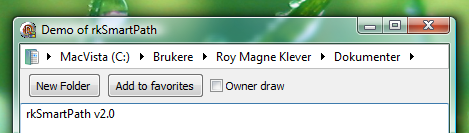
Smart Path v2 in action

Smart path demo application

After a lot of testing, tweaking and fixing version 2 of rkSmartPath is available.
Whats new:

* Now it is possible to disable edit of path
* Added owner draw event
* Using displayname for folders
* Added search event. Use path edit for searching/filtering
* Tweaks and fixes
* End arrow only if there is folders in last folder

What is rkSmartPath: it is a component for Delphi that will allow you to navigate the filesystem similar to explorer in Vista. Folder path is represented as buttons and arrows. Pressing a button will allow you to set that path, pressing an arrow will let you pick a folder in that folder. Try the demo and you see what I am talking about.

Download Project(265kB)

Update 03.02.2010:
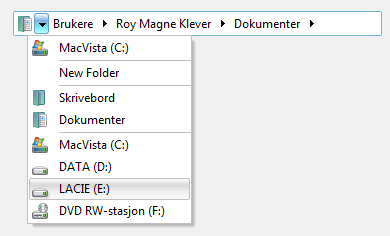
TBXSmartPath

How it looks with Athen theme

Download TBX test version

Tags: , ,

  • Adv22

    Useful component. FreeCommander can use it (freecommander.com)

  • http://www.carthagosoft.net/ André Santos

    Hi,

    Very nice component.
    Thanks for making it available.

    One question: Are you planning a TBX compatible version?

    Thanks!

  • admin

    After I started using this component myself I miss it whenever it is not present… It is a time saver.

  • admin

    Hi André,

    Your welcome, it depends what you mean with TBX compatible version. I do have a version or rather a demo that uses a tbx popup menu instead of the standard popup menu but it is not as good as the default one… some limits in the way I do it. If you just want to paint it like tbx I think it is easy using ownerdraw event… but not that easy.

  • http://www.carthagosoft.net/ André Santos

    Hi Roy,

    thanks for your answer.

    Yes, sorry for being a bit vague. Indeed a compatible version would be using the TB2KTBX menus and draw the buttons on each folder slot using the current theme shapecolors.

    The menu should be fairly easy. Not sure about painting the button, i would rather have it built in then using the owner-draw stuff.

    I was thinking about porting the component to a TBX aware version, but since you made some themes for TBX, maybe you did have that in mind.

    Anyway, I'll see.

    Thanks

  • andrefm

    Hi Roy,
    Component is great and would only support the improvement to add compatibility to TBX (SpTBXLib) or to have have a option to have a look of Office XP,2003 and 2007.
    I can probably imagine that would be a hard job :-(

    Thanks

  • Javier Santo Domingo

    Hey guys,

    It's not too much work to adapt the work of Roy to your needs. Look at the PaintButton() method. The adjustment can be achieved easily by replacing the hard-coded colours by getting them from the SkinManager of SpTBXLib or any other colour provider of any other third party component library (oh btw, if you need it border-compatible, use it border less, and put a parental TSpTBXPanel or similar to simulate the border, thats tricky but will give you a solution right now).
    Anyway, I dont think it's the smartest solution. I mean, may be a more useful enhacement that we can ask to Roy is to add properties that allow access to the colours used to paint the whole control. That will allow anybody to overwrite the colour scheme to suit any kind of needs.

    Regards

  • admin

    Added tbx test version. What do you think? Like it or not?

    Roy M Klever

  • andrefm

    Excellent update ;-)
    Thank you

  • http://www.carthagosoft.net/ André Santos

    Looks and works excellent. Thank you for the update.

    Let me had this suggestions:
    - a custom event to add additional icons to the root menu
    - the icons for Desktop and “My documents” are not standard (they are displaying the actual folder icon rather then the “special” icon
    (that's it for now)

    Thanks again

  • Raymond Allan

    Hi,

    Using Delphi 7 with Windows 7

    Was trying to install your SmartPath component but got the following errors

    [Error] rkSmartPath.pas(161): Property 'OnMouseEnter' does not exist in base class

    [Error] rkSmartPath.pas(162): Property 'OnMouseLeave' does not exist in base class

    [Error] rkSmartPath.pas(460): Undeclared identifier: 'CSIDL_MYMUSIC'

    [Error] rkSmartPath.pas(468): Undeclared identifier: 'CSIDL_MYVIDEO'

    [Fatal Error] dclusr.dpk(37): Could not compile used unit 'D:Delphi_7FmComprkSmartPath.pas'

  • http://www.carthagosoft.net/ André Santos

    To compile in Delphi 7:

    a) Remove both line 161 and 162.

    b) add
    CSIDL_MYMUSIC = $000D;
    CSIDL_MYVIDEO = $000E;
    lines to the const section (line 14)

  • http://www.finalbuilder.com/ Vincent Parrett

    Very nice, I am using your control for inspiration for my own custom control. One thing you might want to consider, is only creating FPathEdit when it's actually needed. If you have a form with lots of edits you are using a lot of resources that are not needed.. you can only edit one field at a time so why have all those hidden edit controls.

    Also, consider adding this :
    SHAutoComplete(FEditPath.Handle, SHACF_FILESYSTEM or SHACF_URLHISTORY or SHACF_URLMRU or SHACF_AUTOSUGGEST_FORCE_ON or SHACF_AUTOAPPEND_FORCE_ON);

    That will give you autocompletion when in edit mode, just like in explorer.

  • Raymond Allan

    Thanks Andre,

    It works a treat with the changes

  • admin

    Hi Vincent,
    I changed the edit to be created only when needed when I added support for the autocomplete. I did not know about this function. Any drawbacks I should know about? Seems to be working very well. Will test a little more before updating zip. Thanks for the idea.

    Roy M Klever

  • admin

    Hi André,

    I will consider your suggestion, I like the idea. Regarding the icons it is the right icons showing up. It is the real desktop folder, for the current user, that is linked in and not the virtual that Windows shell is using. The same with my documents.

    Roy M Klever

  • http://www.carthagosoft.net/ André Santos

    Thanks for your answer.

    Regarding the icons of documents and desktop, I only tested in Windows XP with Delphi 7.

    Your code:
    if spDesktop in FSpecialFolders then
    begin
    FName := GetSpecialFolderPath(CSIDL_DESKTOPDIRECTORY);
    s := ExtractFileName(Fname);
    SelectedPIDL := PathToPIDL(FName);
    SHGetFileInfo(PChar(SelectedPIDL), FILE_ATTRIBUTE_NORMAL, SFI, SSI, Flag);
    AddMenuItem(FName, SFI.szDisplayName, SFI.iIcon);
    end;

    Basically you are asking for the file icon (via SHGetFileInfo) of the desktop path eg:
    “c:documents and settingsuser1desktop”
    in my system this will give you a normal folder icon

    my code
    if spDesktop in FSpecialFolders then
    begin
    FName := GetSpecialFolderPath(CSIDL_DESKTOPDIRECTORY);
    ShGetSpecialFolderLocation(Handle, CSIDL_DESKTOP, SelectedPIDL);
    ShGetFileInfo(PChar(SelectedPIDL), SHGFI_USEFILEATTRIBUTES, SFI, sizeof(ShFileInfo), SHGFI_DISPLAYNAME or SHGFI_ICON or SHGFI_PIDL);
    AddMenuItem(FName, SFI.szDisplayName, SFI.iIcon);
    end;

    Gives me the proper desktop icon, instead of the icon of the folder which the desktop is based.

    See this image
    http://www.carthagosoft.net/RkSmartPath.png

    Note that my “my documents” folder (in XP) is a pointer to d:documentos folder

    Thanks

  • http://www.carthagosoft.net/ André Santos

    Can't edit my post above, since I stated I only tested in Xp, I also tested on Win 7 in the meantime

    thanks

  • raymondallan

    Hi,

    When adding folders to the SmartPath favourites, if you have the same folder name on 2 or 3 different drives, there is no way to tell what drive the folder is in when viewed in the menu, or am I missing something ?

    Raymond

  • admin

    Hi Raymond,

    You have a good point there, any suggestion of how to solve it? Menuitems can not show hints as far as I know. I will think about it and see if I can come up with something, but not easy to solve I guess.

    Roy M Klever

  • Raymond Allan

    Hi Roy,

    I can imagine this being tricky, in my app I have a seperate “Favourites” which displays the full path, my app favourites populates the SmartPath favourites.

    I know the full pathname is not a viable option for the SmartPath favourites due to the real estate.

    Do you have any plans to add a “Before PopPup” event in SmartPath, would be good to capture this when the arrow is clcked

    Raymond
    Did you receive my app via email ?

  • admin

    Hi Raymond,

    Yes I have a plan about adding before popup event and I guess that could be a solution.

    Yes I got your app :) I send you an email later today.

    Roy M Klever

  • http://www.carthagosoft.net/ André Santos

    Hi,

    Found a bug, smartPath does not handle correcly folders like this: \afolderOnMyNetworkdownloadsetc

    Thanks

  • http://www.carthagosoft.net/ André Santos

    I did fix this like this:

    in procedure SetPath
    instead of
    FPaths.Text := Trim(StringReplace(FPath, '', #13, [rfReplaceAll]));
    I did
    if Copy (FPath, 1,2) = '\' then
    begin
    FPaths.Text := Trim(StringReplace(FPath, '', #13, [rfReplaceAll]));
    FPaths.Text := '\' + FPaths.Text;
    end
    else
    FPaths.Text := Trim(StringReplace(FPath, '', #13, [rfReplaceAll]));

  • admin

    I have added this fix to the component. Thanks for pointing it out. I do not use network disks so I didnt even think about it… Now I have tested and it seems to work. Will upload updated version soon.

blog comments powered by Disqus