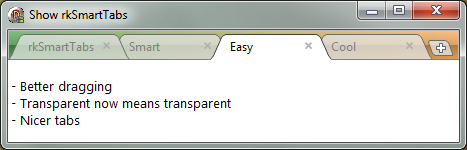
rkSmartTabs updated to version 1.5

Transparent tabs

rkSmartTabs on a rkVistaPanel

This is an update of my rkSmartTabs component.

What is new:

* Better dragging of tabs, more like Chrome. Easier to drag
* Nicer tabs, better rendering
* Real transparent rendering

Download SmartTabs1.5
Download SmartTabs for XE

  • Edwin

    Wonderful, does it support Delphi 7?

  • http://www.magchat.com Markgundy

    I didn’t see a link to email you sooo… not sure how to get a hold of you… some wonderful work here… perhaps you might be interested in another project I’m working on: http://www.magchat.com where you could reach me.

  • Tikl

    It looks very good! Keep up the good work!
    Question: is there a way to display the tabs at the bottom?

  • admin

    Sorry but there is no way to display tabs at the bottom. Maybe I add it later.

    Roy M Klever

  • admin

    Sorry but there is no way to display tabs at the bottom. Maybe I add it later.

    Roy M Klever

  • admin

    I belive you can mke it compile in Delphi 7 only thing I can think of that needs to be changed is to remove the inline statement since Delphi 7 is missing it.

    Roy M Klever

  • admin

    I belive you can mke it compile in Delphi 7 only thing I can think of that needs to be changed is to remove the inline statement since Delphi 7 is missing it.

    Roy M Klever

  • Simon H.

    Very nice. Thanks Roy!

    Would it be possible to limit the maximum tab width to the width of the tab caption (and tab image, if that’s in use) ?

  • Giovanni Ferrari

    Trying to install rkSmartTabs under D7 but the compiler complains over

    property OnMouseEnter does not exists in base class !

    Any clue?

  • admin

    Hi Giovanni,

    Just remove the property it was introduced in a later Delphi version.

    Regards
    Roy M Klever

  • admin

    Hi Simon,

    You mean to have different width on the tabs? For the moment it is not possible.

    Regards
    Roy M Klever

  • Guest

    Could your components be used in commercial applications?

  • admin

    Yes as long as you follow the mpl license.

    Roy M Klever

  • admin

    Hi Markgundy,

    If you want to contact me the easiest way is to use the contact page which you find under the pages dropdown.

    Regards
    Roy M Klever

  • Marcos

    Whould be possible you add support to navigator and popup buttons on right of tabs? And not cut out the caption of tabs?

  • admin

    Hi Marcos,

    If I did that it would become a new component. Maybe I do it but not in a while. It could be a nice option.

    Regards
    Roy M Klever

  • Warren Postma

    Crashes for me when instantiating a new control, on Delphi XE.  
    [422A1207]{Tee9150.bpl } Gdipapi.TGdiplusBase.NewInstance + $B[5003A753]{rtl150.bpl  } System.@ClassCreate (Line 12121, “System.pas” + 5) + $0[422B467A]{Tee9150.bpl } Gdipobj.TGPSolidBrush + $E[5025C352]{vcl150.bpl  } Graphics.ColorToRGB (Line 2229, “Graphics.pas” + 1) + $6[19542A45]{rkSmartTabs_dxe.bpl} rkSmartTabs.Blend (Line 187, “rkSmartTabs.pas” + 3) + $2
    Warren

  • admin

    Hi Warren,

    I belive this has todo with Delphi Xe having its own GDI plus units. You can try to download the XE version I just added. It was given to me by another XE user and should work. Basicly it just renames the GDI units. Hope this helps.

    Regards
    Roy M Klever

  • Asep Rohimat

    Hi, Admin. Thanks alot for share this component. I have spend many time to search this component, and at last i found it in this page. Hatur Nuhun Pisan Lur….